
JPG → PNG Converter
Convert JPEG images to PNG instantly in your browserRuns entirely in your browser — nothing is uploaded. No limits, no signup.
By Alex Johnson — I added image conversion to Virtual Text Tools after noticing most free converters upload your images to their servers — which is a real privacy concern when you're converting screenshots of client work or internal documents. Our JPG to PNG converter runs entirely in your browser. Here's everything you need to know about the two formats and when to use each.
JPEG and PNG are the two most widely used image formats on the internet — together they account for over 70% of all images served online according to the HTTP Archive Web Almanac 2023. Knowing when to use each, and how to convert between them for free, is a practical skill for designers, developers, marketers, and anyone who works with digital images.
This guide covers the fastest way to convert JPG to PNG online for free, explains when you actually need to convert, and answers the most common questions about the two formats.
⚡ Quick answer: Drag and drop your image into the converter above and click Download PNG. Your image never leaves your browser. No account, no limits. Need other utilities? See all 19 tools.
JPG vs PNG — what is the actual difference?
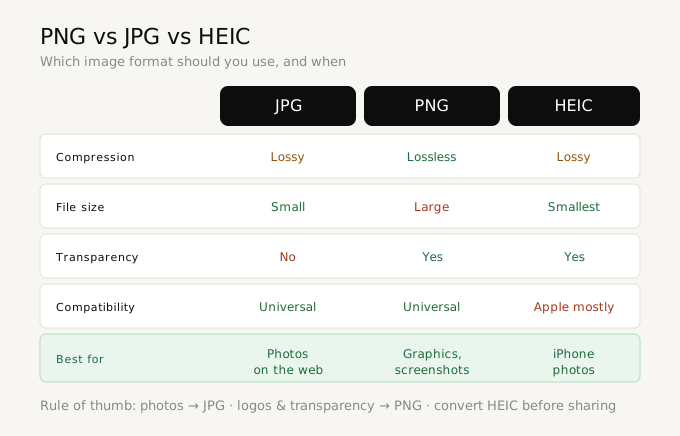
Both are raster image formats (made of pixels), but they use fundamentally different compression approaches:
- JPEG (JPG) uses lossy compression — it permanently discards some pixel data to achieve smaller file sizes. A photograph saved as JPEG at typical quality settings is about 10-20x smaller than an uncompressed equivalent. The trade-off is visible artifacts around sharp edges, especially text and logos. JPEG was standardized by the Joint Photographic Experts Group in 1992.
- PNG uses lossless compression — all pixel data is preserved exactly. PNG files are larger than JPEG for photographs, but support transparency (alpha channel) and handle sharp edges, text, and flat colors without artifacts. PNG was created in 1996 as an open, patent-free alternative to GIF.
- WEBP is a newer format developed by Google in 2010 that offers both lossy and lossless compression with generally smaller file sizes than either JPEG or PNG. As of 2023, WEBP is supported by all major browsers and accounts for a growing share of web images.
When should you convert JPG to PNG?
Converting from JPG to PNG makes sense in these situations:
- You need a transparent background — JPEG does not support transparency. If you want to remove the background from an image and save it with a transparent area, you must convert to PNG first.
- Your image contains text, logos, or sharp edges — JPEG's lossy compression creates visible artifacts (blurring, color fringing) around high-contrast edges like text and icons. PNG preserves these crisp.
- You need to edit and re-save multiple times — Every time you save a JPEG, it re-compresses and loses more quality. PNG is lossless, so repeated saves have no quality impact.
- Platform requirements — Some platforms require PNG. App store icons, for example, must be PNG. Many design tools also work better with PNG for logos and UI elements.
When should you keep JPG and not convert?
- Photographs for the web — JPEG's smaller file size loads faster. A photograph that is 500KB as JPEG might be 3-5MB as PNG, significantly slowing page load times.
- Email attachments — JPEG keeps file sizes small for email.
- Social media photos — Most social platforms re-compress images anyway, making the format difference negligible for photographs.
How to convert JPG to PNG online — step by step
- Go to Virtual Text Tools and click the JPG → PNG tab
- Drag and drop your JPG, JPEG, WEBP, or BMP file onto the upload area — or click to browse
- Your original image appears on the left with its dimensions and file size
- The PNG preview appears on the right instantly
- Optionally adjust the background (White, Transparent, or Black) and scale (50%, 75%, original size, or 2x)
- Click Download PNG — the file saves with the same name as your original but with a .png extension
Is it safe to use a free online image converter?
This depends entirely on how the tool works. Most free online converters upload your images to their servers to process them. This is a significant privacy concern if your images contain sensitive content — internal documents, client work, personal photos, or confidential designs.
Virtual Text Tools converts images entirely in your browser using the HTML5 Canvas API. Your image is loaded into memory locally, drawn onto a canvas element, and exported as a PNG — all without any network request. You can verify this using your browser's developer tools (Network tab): you will see zero outgoing requests containing your image data.
For sensitive images, browser-based conversion is the only safe choice.
What is the best free JPG to PNG converter in 2026?
Here are the main options:
- Virtual Text Tools — fully browser-based, no upload, no account, supports JPG/WEBP/BMP to PNG. Best for privacy-sensitive images.
- CloudConvert — server-based, supports over 200 formats, high-quality output. Best for complex batch conversions or format combinations. Free tier allows 25 conversions per day.
- Squoosh (by Google) — browser-based, excellent for compression alongside format conversion. Best when you also need to optimize file size.
- ILoveIMG — server-based, supports batch conversion of multiple files. Best for converting many images at once. Uses servers in the EU.
Convert JPG to PNG free — no account needed
Drag and drop your image. Preview instantly. Download PNG. Your image never leaves your browser.
Open JPG to PNG Converter →Frequently asked questions
How do I convert JPG to PNG online for free?
Go to Virtual Text Tools, drag and drop your JPG, and click Download PNG. The conversion happens in your browser — no server upload, no account required, completely free.
Does converting JPG to PNG reduce quality?
No quality is lost going from JPG to PNG. PNG uses lossless compression, so all pixel data from your JPG is preserved exactly. The PNG file will be larger in size since it does not use lossy compression.
When should I use PNG instead of JPG?
Use PNG when you need transparency, when your image contains text or logos, or when you need to edit and re-save without quality loss. Use JPG for photographs where file size matters more than pixel-perfect quality.
Is it safe to use a free online converter for sensitive images?
Only if the tool is browser-based. Server-based converters upload your images to their servers. Virtual Text Tools converts entirely in your browser — images never leave your device.
Can I convert WEBP to PNG for free?
Yes. Virtual Text Tools supports WEBP, BMP, and JPEG to PNG conversion in addition to JPG. Drag and drop any supported format and download the PNG output. No account required.