
By Alex Johnson — If you've ever debugged an API call at 11pm wondering why your query string is breaking, you know the pain of URL encoding. I built the URL encoder/decoder on Virtual Text Tools specifically for developers who need a quick browser-based tool — no searching for an online tool that sends your data to a server. Here's how URL encoding works and how to use it.
URLs can only contain a specific set of characters. When a URL contains spaces, special characters, or non-ASCII text, those characters need to be encoded — replaced with a percent sign followed by a hex code. Decoding reverses this process. If you've ever seen a URL with %20 in it, that's an encoded space.
⚡ Quick answer: Paste your URL or string into the tool above and click Encode or Decode. The result is instant, and no signup is needed. Need other utilities? See all 19 tools.
Why URL encoding matters
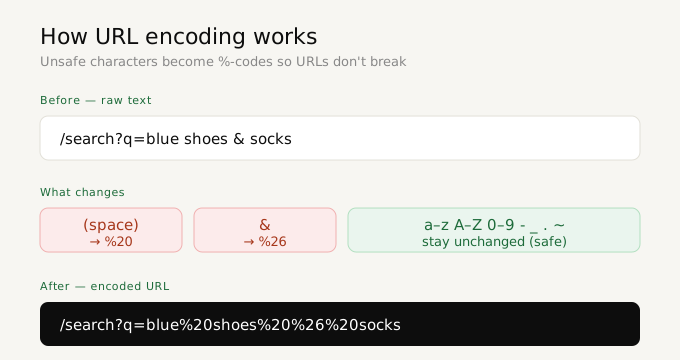
URL encoding is specified in RFC 3986, the internet standard published by the IETF. A URL can only safely contain 66 unreserved characters — the 26 letters (upper and lowercase), digits 0–9, and four symbols: hyphen, underscore, period, and tilde. Every other character must be percent-encoded. With over 5 billion internet users worldwide and URLs used in every web request, malformed URLs are one of the most common sources of broken links and failed API calls.
URLs have a strict specification — only letters, digits, and a handful of special characters are allowed unencoded. Everything else must be percent-encoded. This matters when:
- Building links — query strings with spaces or special characters will break without encoding
- API development — passing parameters in GET requests requires proper encoding (for tokens and binary data, see also Base64 encoding)
- Debugging — decoding an encoded URL reveals what parameters are actually being sent
- SEO and analytics — tracking URLs often contain encoded campaign parameters
- Form submissions — browser form data is URL-encoded before being sent
Why URLs need encoding — the technical background
URLs were originally defined to contain only ASCII characters — the 128 characters in the original ASCII standard from 1963. The internet has evolved far beyond English-only content, but the URL specification has remained technically limited. URL encoding is the mechanism that allows any character to be safely represented in a URL by expressing it as a percent sign followed by two hexadecimal digits.
This encoding scheme is specified in RFC 3986 (published 2005), which superseded the earlier RFC 2396. It defines exactly which characters are "unreserved" (safe to use without encoding) and which are "reserved" (have special meaning in URL structure). The 66 unreserved characters are: A-Z, a-z, 0-9, hyphen (-), underscore (_), period (.), and tilde (~). Every other character requires percent-encoding.
Common URL encoding scenarios developers encounter
Query string parameters
The most common URL encoding scenario is query string parameters. When a user searches for "hello world" and the search term needs to be passed in a URL, it must be encoded: ?q=hello%20world or ?q=hello+world (the + form is used in HTML form submissions). If the search term contains special characters like &, =, or #, failing to encode them would break the URL structure entirely.
OAuth and API authentication
OAuth 1.0 and many API authentication schemes require parameters to be percent-encoded as part of their signature generation process. The exact encoding rules matter — a space must be %20 (not +), and characters like !, *, (, ) must be encoded. Getting this wrong produces invalid signatures that result in 401 Unauthorized errors that can take hours to debug.
Internationalized domain names and paths
URLs containing non-ASCII characters — Arabic, Chinese, Cyrillic, accented Latin characters — must be encoded. A URL containing "café" becomes "caf%C3%A9" in percent-encoded form. Browsers display the decoded version in the address bar but transmit the encoded form in HTTP requests. Understanding both representations is essential for debugging cross-language web applications.
UTM tracking parameters
Marketing tracking URLs with UTM parameters often contain characters that need encoding — particularly when the campaign name or content contains spaces, ampersands, or special characters. A UTM URL like utm_campaign=summer sale&utm_content=email #3 must be encoded as utm_campaign=summer%20sale&utm_content=email%20%233 to function correctly in analytics tools.
Encode URL vs encode component — the practical difference
The distinction between these two modes trips up many developers. Here is the most practical way to think about it:
Use Encode URL when you have a complete, valid URL that you need to make safe for embedding in HTML, text, or another URL. It preserves characters that give the URL its structure: ://?#&=[]@!$'()*+,;
Use Encode Component when you are encoding a single value that will be part of a URL — a search term, a user name, a file path, or a parameter value. It encodes everything that might be misinterpreted as URL structure, including ://?#&=
The simplest rule: if you are building a URL from parts, encode each part with encodeURIComponent and then assemble them. If you have a complete URL you want to transmit safely, use encodeURI.
The 4 encoding modes explained
Encode URL
Encodes an entire URL, preserving characters that are valid in a URL structure like slashes, colons, and question marks. Use this when you have a full URL and want to make it safe to share or embed.
Decode URL
Reverses full URL encoding — converts %20 back to spaces, %26 back to &, and so on. Use this to read an encoded URL in plain text.
Encode component
Encodes a URL component (like a query parameter value) more aggressively — encodes slashes, colons, and other characters that are valid in a full URL but not in a query value. Use this for individual parameter values.
Decode component
Reverses component encoding. Use this to read encoded query parameter values.
Common URL encoding reference
Here are the most frequently encoded characters you'll encounter:
- Space → %20
- & → %26
- = → %3D
- + → %2B
- / → %2F
- ? → %3F
- # → %23
- @ → %40
Frequently asked questions
What's the difference between encode URL and encode component?
Encode URL preserves characters that are structurally valid in a URL (like /, ?, &, #). Encode component treats all of these as data and encodes them too — making it safe for use as a query parameter value where those characters would otherwise be interpreted as URL structure.
Why does my encoded URL have + instead of %20?
Some systems use + to represent spaces in query strings (application/x-www-form-urlencoded format), while others use %20 (standard percent encoding). Both are valid in different contexts — this tool uses %20, which is universally compatible.
Is my data private?
Yes — all encoding and decoding happens locally in your browser. Nothing is sent to a server.