
Base64 Encoder & Decoder
Runs entirely in your browser — nothing is uploaded. No limits, no signup.
By Alex Johnson — Base64 is one of those things developers reach for constantly without thinking about it: decoding a JWT to see what is inside, checking an auth header, embedding a small image in CSS. The tool I kept hitting problems with was emoji and non-English text — most online Base64 tools silently corrupt anything beyond basic ASCII because of how the browser's native functions work. So when I built this one for Virtual Text Tools, proper UTF-8 handling was the first requirement. Here is the full guide.
Base64 is the duct tape of data transport. It takes any data — text, images, binary files — and converts it into a string of plain, safe characters that can travel through systems designed only for text: URLs, JSON, email, HTML attributes, HTTP headers. If you have ever looked inside a JWT token, an email attachment, or a data URI in CSS, you have seen Base64.
⚡ Quick answer: Use the tool above — choose Encode or Decode, then type or paste. The result appears live as you type. Full UTF-8 support, URL-safe variant included, nothing uploaded. Need other utilities? See all 19 tools.
What Base64 actually is — and what it is not
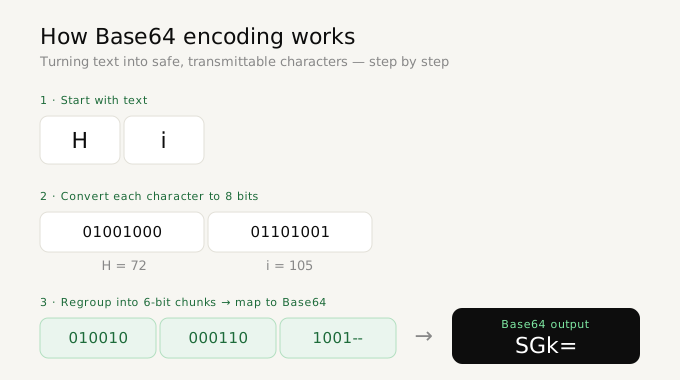
Base64 represents binary data using 64 safe characters: A-Z, a-z, 0-9, + and /, with = used as padding. Every 3 bytes of input become 4 Base64 characters, which is why encoded output is roughly 33 percent larger than the original.
Here is the critical thing to understand: Base64 is encoding, not encryption. It provides zero security. Anyone can decode a Base64 string instantly — it is a reversible transformation with no key and no secret. Its purpose is safe transport, not protection.
This misunderstanding causes real security incidents. Developers sometimes Base64-encode passwords or API keys and believe they are protected. They are not — it is the equivalent of writing a secret in pig latin. If you need to protect data, you need actual encryption. If you just need data to survive being put in a URL or a JSON string, Base64 is the right tool.
Where you encounter Base64 every day
- JWT tokens: the authentication tokens used by most modern web apps are three Base64 sections joined by dots. Decoding the middle section shows the token's claims — user ID, expiry, permissions.
- HTTP Basic Authentication: the
Authorization: Basic ...header is justusername:passwordBase64-encoded. (Which is exactly why Basic Auth requires HTTPS — the encoding provides no protection.) - Data URIs: small images embedded directly in CSS or HTML as
data:image/png;base64,...to avoid extra network requests. - Email attachments: every file you have ever emailed was Base64-encoded for transport, because email infrastructure was built for text.
- API payloads: binary data inside JSON (which has no binary type) travels as Base64 strings.
- Configuration secrets: Kubernetes secrets, CI/CD variables, and many config systems store values Base64-encoded.
Standard vs URL-safe Base64
Standard Base64 uses + and /, but both characters have special meanings in URLs: + means a space, and / is a path separator. Putting standard Base64 in a URL breaks things.
URL-safe Base64 (defined in RFC 4648) solves this with two substitutions: + becomes - and / becomes _. The trailing = padding is also usually dropped. JWTs use URL-safe Base64, which is why pasting a JWT into a standard decoder sometimes fails.
The Virtual Text Tools Base64 tool has a URL-safe toggle — flip it on when working with JWTs, URL parameters, or anything that came out of a web address. The tool also automatically restores missing padding when decoding URL-safe input, which is the other common failure point.
The UTF-8 problem most Base64 tools have
This is the technical detail that separates a correct Base64 tool from a broken one.
Browsers have built-in functions for Base64: btoa() to encode and atob() to decode. The catch: they only handle single-byte characters. The moment your text contains an emoji, an accented character like é, or any non-Latin script — Japanese, Arabic, Cyrillic — raw btoa() throws an error or silently corrupts the data, because those characters are multi-byte in UTF-8.
Many online Base64 tools use these functions directly and inherit the bug. Encode "café ☕" on one of them and you will get an error or garbage.
The correct approach, and the one Virtual Text Tools uses, is to first convert the text to UTF-8 bytes with TextEncoder, then Base64-encode the bytes — and reverse the process with TextDecoder when decoding. The result: emoji, accents, and every script round-trip perfectly.
// The broken way (fails on emoji and accents):
btoa("café ☕")  // ❌ throws InvalidCharacterError

// The correct way:
const bytes = new TextEncoder().encode("café ☕");
// ...then Base64-encode the bytes  // ✅ works for all text
How to encode or decode Base64 — step by step
- Go to Virtual Text Tools and open the Code category, then Base64
- Choose Encode (text to Base64) or Decode (Base64 to text)
- Type or paste your input — the result appears live as you type
- If you are working with a JWT or URL parameter, enable the URL-safe toggle
- Use Swap to flip the output back into the input and reverse the operation — useful for verifying a round trip
- Click Copy to copy the result
Why decode failures happen — and how to fix them
If a Base64 string will not decode, it is almost always one of these:
- It is URL-safe Base64. Contains
-or_instead of+or/. Enable the URL-safe toggle. - Missing padding. The string length is not a multiple of 4 because trailing
=characters were stripped. The URL-safe mode restores padding automatically. - Whitespace or line breaks. Base64 copied from emails or terminal output often has line wraps inserted. The tool trims surrounding whitespace, but internal line breaks may need removing — the whitespace cleaner handles that in one click.
- It is not actually Base64. Hex strings, URL-encoded text, and random tokens look superficially similar. If it contains characters outside the Base64 alphabet, it is something else.
Privacy — why this matters for Base64 specifically
Think about what people paste into Base64 decoders: JWT auth tokens, API credentials, Basic Auth headers, config secrets. This is some of the most sensitive material a developer handles, and a server-based tool sees every byte of it.
Virtual Text Tools encodes and decodes entirely in your browser. Your tokens and credentials never leave your device — there is no server request, no logging, no retention. You can verify this in your browser's developer tools: the Network tab shows zero outgoing requests while you work. For anything containing live credentials, this is not a nice-to-have; it is the only responsible way to use an online tool.
Encode & decode Base64 free — nothing uploaded
Live conversion, full UTF-8 support, URL-safe variant. Runs entirely in your browser.
Open Base64 tool →Frequently asked questions
Is Base64 encryption?
No. Base64 is a reversible encoding with no key and no secret — anyone can decode it instantly. Never use it to protect passwords or sensitive data. Its job is safe transport through text-only systems, not security.
Why is Base64 output larger than the input?
Every 3 bytes of input become 4 output characters, so Base64 is about 33 percent larger than the original data. That is the cost of representing arbitrary data using only 64 safe characters.
What is URL-safe Base64?
A variant that replaces + with - and / with _ so the result is safe in URLs and filenames. JWTs use it. Toggle the URL-safe option when encoding for URLs or decoding tokens.
Can I decode a JWT with this tool?
Yes. A JWT is three URL-safe Base64 sections separated by dots. Paste the header or payload section (the first or second part), enable URL-safe mode, and decode to see the JSON inside. You can then paste that into the JSON formatter to read it cleanly.
Does this work with emoji and non-English text?
Yes. The tool uses proper UTF-8 handling via TextEncoder and TextDecoder, so emoji, accented characters, and all scripts encode and decode correctly — unlike tools built on raw btoa() which fail on multi-byte characters.