
By Alex Johnson — Password requirements are the quiet tax every developer pays when signing up for new services. Every site has different rules — minimum length, required character types, symbols allowed or banned. I built the password generator for Virtual Text Tools partly out of that frustration, and partly because most free generators I tested were using Math.random() — which sounds fine until you understand why it is completely wrong for security. Here is the complete guide to password security in 2026.
Passwords are the weakest link in most people's digital security — not because the concept is flawed, but because the way most people create and manage them is. The 2024 Verizon Data Breach Investigations Report found that over 80% of hacking-related breaches involved stolen or weak credentials. NordPass's annual study of the most common passwords found that "123456" and "password" remain in the top ten globally despite decades of security warnings.
A strong, randomly generated password eliminates both of those problems entirely. The challenge is generating one quickly, ensuring it meets the specific requirements of the site you are signing up for, and doing it without trusting your credentials to a third-party server.
⚡ Quick answer: Use the generator above — pick a site preset or set your own length and character types. Nothing is stored or transmitted. Free, no account required. Need other utilities? See all 19 tools.
Why Math.random() is wrong for passwords
Most online password generators — including many popular ones — use JavaScript's built-in Math.random() function to pick characters. This seems reasonable but has a fundamental security problem: Math.random() is a pseudo-random number generator. It produces numbers that appear random but are generated by a deterministic algorithm seeded from a predictable source (typically the current timestamp).
In practice this means:
- Two calls to
Math.random()at the same millisecond can produce the same sequence - The output is reproducible if an attacker knows or can guess the seed
- Security researchers have demonstrated that
Math.random()output can be predicted from a known sequence of previous outputs
Virtual Text Tools uses crypto.getRandomValues() — the Web Crypto API built into every modern browser. This generates randomness from the operating system's entropy pool, which combines hardware events (mouse movements, disk activity, network timing) into a source of unpredictability that cannot be predicted or reproduced. It is the same randomness standard used in SSL/TLS certificate generation and encryption key creation.
The difference in practice: a password from Math.random() might be technically random-looking but theoretically predictable. A password from crypto.getRandomValues() is cryptographically unpredictable, which is what security actually requires.
Password requirements for major websites in 2026
Every major site has different rules. Here are the verified requirements for the 11 most commonly used services:
NIST password guidelines 2026 — what changed
The National Institute of Standards and Technology (NIST) is the US federal body that sets cybersecurity standards for government systems. Their Special Publication 800-63B is the most cited password security standard globally, used as the basis for enterprise security policies, banking requirements, and government authentication systems worldwide.
The 2026 update to NIST SP 800-63B made several significant changes that affect how passwords should be created and managed:
- Minimum length raised to 15 characters for single-factor authentication (previously 8 for most systems)
- Maximum length must be at least 64 characters — systems must not truncate passwords
- All printable ASCII characters must be supported including spaces and special characters
- No complexity rules — NIST now explicitly recommends against mandatory complexity rules (must include uppercase, number, etc.) because they lead to predictable patterns like "Password1!"
- No mandatory rotation — NIST recommends against forcing periodic password changes unless there is evidence of compromise, because rotation leads to weaker passwords
- Password screening against breach databases — new passwords should be checked against known compromised password lists
The practical implication of the NIST 2026 update: a 15-character password made of random mixed characters is significantly more secure than an 8-character password that meets complex rules. Length matters more than complexity, and random generation matters more than either.
How long does it take to crack a password in 2026?
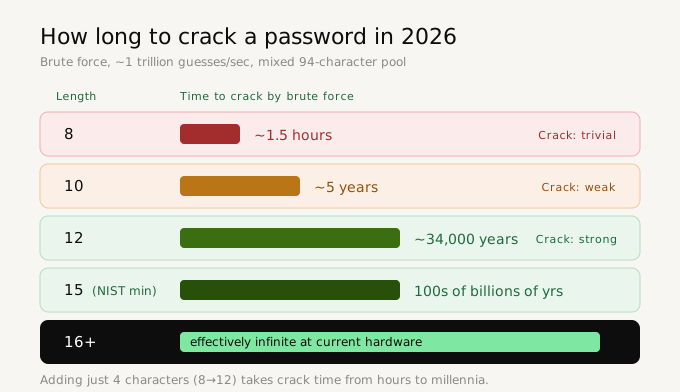
GPU-accelerated password cracking has advanced dramatically. A modern GPU cluster can attempt approximately 1 trillion passwords per second against common hash algorithms. Here is what that means practically for different password lengths (assuming a mixed-character pool of ~94 characters):
- 8 characters: ~1.5 hours to crack by brute force
- 10 characters: ~5 years
- 12 characters: ~34,000 years
- 15 characters: ~hundreds of billions of years
- 16+ characters: effectively infinite at current hardware
The jump from 8 to 12 characters — just four additional characters — increases crack time from hours to millennia. This is why NIST's move to 15 characters as the minimum represents a meaningful security upgrade, not just a bureaucratic change.
These estimates assume the attacker is brute-forcing every possible combination. In reality, most password attacks use dictionary attacks and common pattern lists first — which is why randomly generated passwords (not based on words, names, or patterns) are dramatically harder to crack than even longer human-created passwords.
How to use the password generator
- Go to Virtual Text Tools and click Generate → Password
- Choose a site preset to automatically match the requirements for Google, Apple, Amazon, and more — or set your own
- Adjust the length slider from 8 to 64 characters
- Toggle character types: Uppercase, Lowercase, Numbers, Symbols
- Optionally enable exclude ambiguous characters to remove 0, O, l, 1, I — useful for passwords you might need to read aloud or transcribe
- The password generates instantly. Click it or the copy button to copy to clipboard
- Use Generate 5 to see five options and choose the one that feels right
- The strength meter and crack time estimate update in real time
Should you use a password manager instead?
A password generator and a password manager serve different purposes and are not mutually exclusive — they work best together.
A password generator creates a strong password. A password manager stores it so you never have to remember it, autofills it on login, and alerts you to reused or compromised passwords.
If you generate a 16-character random password and plan to memorise it — do not. Use a password manager. The most widely trusted options in 2026 are Bitwarden (open source, free tier generous), 1Password (paid, excellent UX), and Dashlane (includes breach monitoring).
The workflow that works: use a strong random password generator to create the password, immediately save it to your password manager, never type it manually again. The generator handles creation quality. The manager handles memory and autofill.
Frequently asked questions
Is it safe to generate a password in a browser?
Yes, if the generator uses the Web Crypto API (crypto.getRandomValues) and does not transmit the password to any server. Virtual Text Tools generates entirely in your browser — the password never leaves your device. You can verify this using browser developer tools: open the Network tab while generating and confirm zero outgoing requests.
What are the NIST password requirements in 2026?
NIST SP 800-63B (2026) requires a minimum of 15 characters for single-factor authentication. Systems must support up to at least 64 characters, allow all printable ASCII characters including spaces, and must not enforce complexity rules or periodic rotation. NIST now recommends length over complexity.
How long should a password be in 2026?
At minimum 15 characters for important accounts (NIST 2026 standard). For email, banking, and work accounts, 16–20 random characters is the recommended target. At 16 mixed characters, brute-force cracking is effectively impossible at any current or near-future hardware capability.
What characters should a strong password include?
Uppercase letters (A–Z), lowercase letters (a–z), numbers (0–9), and symbols (!@#$%^&*). Mixing all four types maximises the character pool, which dramatically increases the number of possible combinations. A 12-character password using all four types has approximately 475 trillion trillion possible combinations.
What is the difference between a random password and a passphrase?
A random password is a string of random characters: xK7!mP2qLn9&. A passphrase is a sequence of random words: correct horse battery staple. Both can be equally secure — a 4-word passphrase of random words has roughly the same entropy as a 12-character random password. Passphrases are easier to memorise; random passwords are shorter for the same entropy. For anything stored in a password manager, random passwords are preferable. For a master password you must memorise, a passphrase may be better.
Generate a strong password free — no account needed
11 site presets. Cryptographically secure. Strength meter and crack time. Nothing stored.
Open password generator →