
By Alex Johnson — Character limits trip people up constantly. I built tools for developers but the character counter ends up being the one everyone uses — writers, social media managers, students. Here is the definitive guide to character limits across every major platform in 2026.
Counting characters seems trivial until you need the exact number for a platform that enforces a hard limit. Twitter, Instagram, LinkedIn, Google Ads, SMS, meta descriptions, app store listings — every one of them has a different character ceiling, and going over means your content gets cut off or rejected entirely.
A live online character counter solves this problem in seconds.
⚡ Quick answer: Go to Virtual Text Tools → Counter. Paste your text and see character count, word count, sentence count, line count, and paragraph count update live. Free, no account required.
Character limits for every major platform in 2026
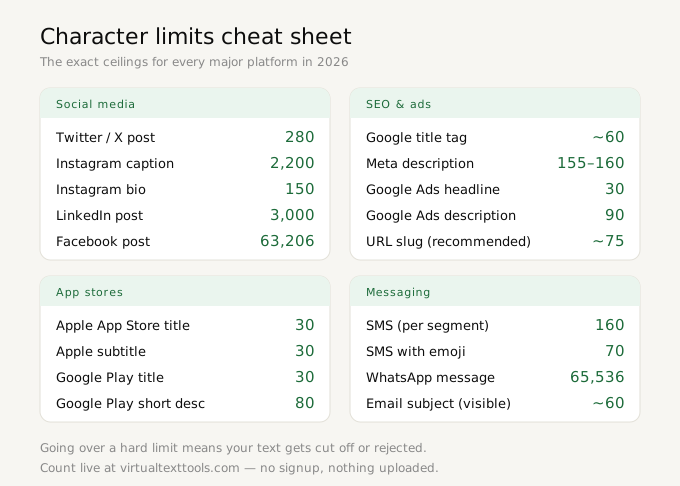
These are the exact character limits you need to know, verified for 2026:
Social media character limits
- Twitter / X post: 280 characters (URLs count as 23 characters regardless of length; Twitter Blue subscribers get up to 4,000 characters)
- Instagram caption: 2,200 characters maximum; first 125 characters visible without tapping "more"
- Instagram bio: 150 characters
- LinkedIn post: 3,000 characters
- LinkedIn headline: 220 characters
- LinkedIn summary: 2,600 characters
- Facebook post: 63,206 characters (effectively unlimited for practical purposes)
- TikTok caption: 2,200 characters
- YouTube title: 100 characters (Google truncates at ~70 in search results)
- YouTube description: 5,000 characters
- Pinterest pin description: 500 characters
SEO character limits
- Google title tag: ~60 characters before truncation in search results (Google measures in pixels, not characters, but 60 is a safe rule)
- Google meta description: 155-160 characters before truncation
- Google Ads headline: 30 characters each (3 headlines per ad)
- Google Ads description: 90 characters each (2 descriptions per ad)
App store character limits
- Apple App Store title: 30 characters
- Apple App Store subtitle: 30 characters
- Apple App Store description: 4,000 characters
- Google Play title: 30 characters
- Google Play short description: 80 characters
- Google Play full description: 4,000 characters
Messaging character limits
- SMS: 160 characters per message segment (GSM-7 encoding); 153 per segment for multi-part messages. Non-ASCII characters (emoji, accented letters) use UCS-2 encoding: 70 characters per segment.
- WhatsApp message: 65,536 characters
Characters with spaces vs without spaces — when each matters
These are two different counts and different contexts call for different ones:
Characters with spaces is what most platform limits measure. Twitter's 280-character limit counts spaces. Google's title tag limit counts spaces. When a platform says "X characters," it almost always means characters including spaces.
Characters without spaces is used in academic publishing, some translation pricing models (where translators charge per character of actual linguistic content), and certain legal and technical document standards. It strips spaces from the count to measure only actual content characters.
Virtual Text Tools shows both counts simultaneously in its live display, so you always have the right number regardless of context.
Why live character counting matters
The difference between a character counter that updates live and one that requires clicking a button is significant in practice. When you are writing directly in the counter field — drafting a tweet, refining a meta description, editing an Instagram caption — a live counter gives you constant feedback as you type. You can see exactly when you cross a threshold and make adjustments in real time rather than writing, checking, rewriting, and checking again.
Social media managers who publish multiple posts daily report spending significantly less time on length management when using live counters versus static ones. The productivity gain is small per post but compounds across hundreds of posts.
Character counting vs word counting — which to use
The right metric depends entirely on your context:
- Platform character limits (Twitter, Instagram, SMS, Google Ads) — use character count
- Academic essays, content briefs, journalism — use word count
- Translation services — often use character count without spaces or word count depending on the language pair
- Reading time estimates — use word count (average adult reads 200-250 words per minute)
- SEO titles and meta descriptions — use character count
Virtual Text Tools shows words, characters, characters without spaces, lines, sentences, and paragraphs all at once, so you can pick the metric that matters for your current task without switching tools or running separate counts.
How to count characters online — step by step
- Go to Virtual Text Tools and click the Counter tab
- Paste or type your text into the input box
- All six counts update live: words, characters, characters without spaces, lines, sentences, paragraphs
- Click Copy text to copy your content, or Clear to reset
Frequently asked questions
Does the character counter include spaces?
Virtual Text Tools shows both characters with spaces and characters without spaces simultaneously, so you have both counts available at all times without switching tools.
What is the Twitter character limit?
Twitter limits standard posts to 280 characters. URLs automatically count as 23 characters regardless of actual length. Twitter Blue subscribers can post up to 4,000 characters.
What is the Instagram caption character limit?
Instagram captions allow up to 2,200 characters. Only the first 125 characters are visible without tapping "more", so your key message should appear within the first 125.
Is there a limit to how much text I can count?
No. Virtual Text Tools runs entirely in your browser with no server processing, so there is no character limit on the input. Paste entire documents if needed.
Count characters free — live, no account needed
6 metrics updated instantly as you type. Works on any device.
Open character counter →